

Description
Description of Arduino Uno With Cable
The Arduino Uno R3 (Grade-A) is a high-quality microcontroller board based on the ATmega328P, designed for coding,
prototyping, electronics learning, and robotics projects. It includes a USB cable for immediate use,
making it ideal for beginners, makers, and professional engineers.
Main features
- Grade-A quality Arduino Uno R3 with durable PCB and stable components
- ATmega328P microcontroller ensures smooth processing and reliability
- 14 digital I/O pins including 6 PWM outputs for motor & LED control
- 6 analog input pins for sensor interfacing and measurement projects
- Compatible with Arduino IDE and most shields, modules & sensors
- On-board 16 MHz crystal oscillator for accurate timing & performance
- USB cable included for plug-and-play connectivity
- Perfect for robotics, IoT, automation, school projects & prototyping
Technical Specifications
| Parameter | Description |
|---|---|
| Microcontroller | ATmega328P |
| Grade | A (High Quality) |
| Operating Voltage | 5V |
| Input Voltage (Recommended) | 7–12V |
| Input Voltage (Limit) | 6–20V |
| Digital I/O Pins | 14 (6 PWM) |
| Analog Input Pins | 6 |
| DC Current per I/O Pin | 20 mA |
| DC Current for 3.3V Pin | 50 mA |
| Flash Memory | 32 KB (0.5 KB bootloader) |
| SRAM | 2 KB |
| EEPROM | 1 KB |
| Clock Speed | 16 MHz |
| LED_BUILTIN | 13 |
| Dimensions (L×W) | 68.6 mm × 53.4 mm |
| Weight | 25 g |
| Country of Origin | China |
Package Content
- 1 × Arduino Uno R3 (High Quality, Grade A)
- 1 × USB Cable
What are Reasons to buy Arduino Uno With Cable ?
Arduino Uno one of the most popular microcontroller in the world. Moreover, it is also very popular in Bangladesh.
Arduino uno is very cost effective microcontroller board great for both professional or educational usages.
The best quality Arduino Uno R3 can be found and purchased in ElectronicsBD
What is Arduino Uno With Cable?
Arduino Uno is a popular microcontroller development board based on the ATmega328P designed for electronics prototyping,
coding, robotics, and IoT learning. It is widely used by students, makers, and engineers for building interactive projects.
How Arduino Uno With Cable Works?
Arduino Uno reads inputs (like sensors, switches, data) and processes them using code uploaded via the Arduino IDE.
It then controls outputs such as LEDs, motors, displays, and modules, enabling automation and interactive electronic projects.
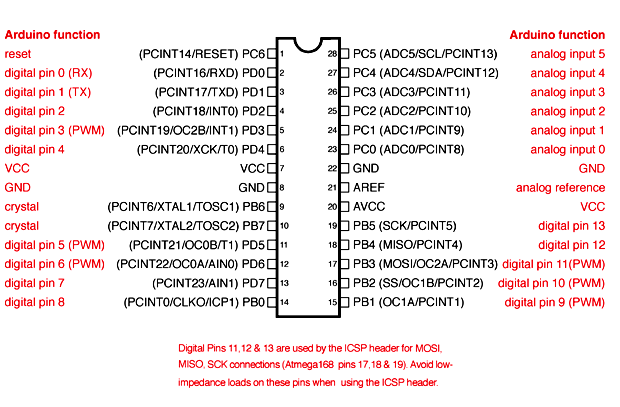
Arduino Uno Pinout Configuration:
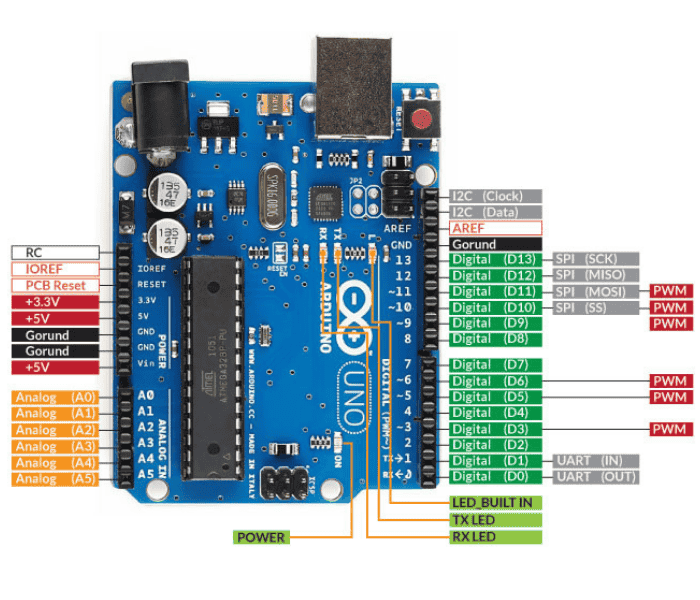
| Pin Category | Pin Name | Pin Description | |||||||
| Power | Vin, 3.3V, 5V, GND | Vin: Input voltage to Arduino when using an external power source. | 5V: Regulated power supply used to power microcontroller and other components on the board. | 3.3V: 3.3V supply generated by on-board voltage regulator. Maximum current draw is 50mA. | GND: ground pins. | ||||
| Reset | Reset | Resets the microcontroller. | |||||||
| Analog Pins | A0 – A5 | Used to provide analog input in the range of 0-5V | |||||||
| Input/Output Pins | Digital Pins 0 – 13 | Can be used as input or output pins. | |||||||
| Serial | 0(Rx), 1(Tx) | Used to receive and transmit TTL serial data. | |||||||
| External Interrupts | 2, 3 | To trigger an interrupt. | |||||||
| PWM | 3, 5, 6, 9, 11 | Provides 8-bit PWM output. | |||||||
| SPI | 10 (SS), 11 (MOSI), 12 (MISO) and 13 (SCK) | Used for SPI communication. | |||||||
| Inbuilt LED | 13 | To turn on the inbuilt LED. | |||||||
| TWI | A4 (SDA), A5 (SCA) | Used for TWI communication. | |||||||
| AREF | AREF | To provide reference voltage for input voltage. |
Now, lets understand the function of each pin under in detail under different category
Power Pins:
Power pins are essential for operating the board and connected devices. The main pins include:
- VIN: Accepts external power sources (7-12V).
- 5V and 3.3V: Provide regulated voltage outputs for peripherals.
- GND (Ground): Completes the circuit.
- IOREF: Supplies a voltage reference for I/O pins.
Tip: Always verify the voltage compatibility of connected components to avoid damage.
Digital Pins (0-13)
The Arduino UNO has 14 digital pins that can function as inputs or outputs.
- Pins 0 (RX) and 1 (TX): Reserved for serial communication.
- Pins 2-13: General-purpose I/O pins.
- PWM Pins (3, 5, 6, 9, 10, 11): Support Pulse Width Modulation, ideal for applications like controlling motors and dimming LEDs.
Use functions like pinMode(), digitalWrite(), and digitalRead() to interact with these pins.
Analog Pins (A0-A5)
Analog pins allow reading continuous voltage signals, often from sensors.
- Resolution: 10-bit (0 to 1023 range).
- Flexibility: Can also function as digital I/O pins when required.
Special Function Pins
- Reset Pin: Resets the board when triggered.
- AREF: Used to provide an external voltage reference for analog inputs.
- Serial Pins (RX/TX): Facilitate UART communication for serial data exchange.
ICSP Header
The ICSP (In-Circuit Serial Programming) header allows direct programming of the microcontroller or connecting additional peripherals.
- MISO (Master-In-Slave-Out): Receives data from peripherals.
- MOSI (Master-Out-Slave-In): Sends data to peripherals.
- SCK (Serial Clock): Synchronizes data transfer.
Communication Pins
- I2C Pins: SCL (Clock line) and SDA (Data line) are located on A5 and A4, respectively.
- SPI Pins: Share functionality with the ICSP header (MISO, MOSI, and SCK).
- UART Pins: TX (Pin 1) and RX (Pin 0) handle serial communication.
Usage/Application
Perfect for school and university electronics learning, robotics projects, IoT experiments,
DIY automation, sensor-based systems, STEM education and rapid prototyping.
Compatible with hundreds of modules, shields, motors, and sensors.
Need Assistance ?
Please call to our office to get more information about products, delivery information, warranty or return policy.
Mobile: +8801316113774
Email: roboshopbd123@gmail.com
FAQs About Arduino Uno With Cable
Q1: Is this Arduino Uno original or clone?
This is a high-quality Grade-A compatible board with reliable performance.
Q2: Can beginners learn programming with this board?
Yes, Arduino Uno is ideal for beginners to learn coding and electronics.
Q3: Does it come with a USB cable?
Yes, the USB cable is included for plug-and-play use.
Q4: Can I use this board for robotics projects?
Absolutely, it supports motors, sensors and modules for robotics.
Q5: Which software is used to program the Arduino Uno?
It is programmed using the Arduino IDE.
Reviews
There are no reviews yet.